
Adding Medicines
Add medicines to your list, set quantities, and choose pricing options
Adding Medicine Steps

Medicine Selection
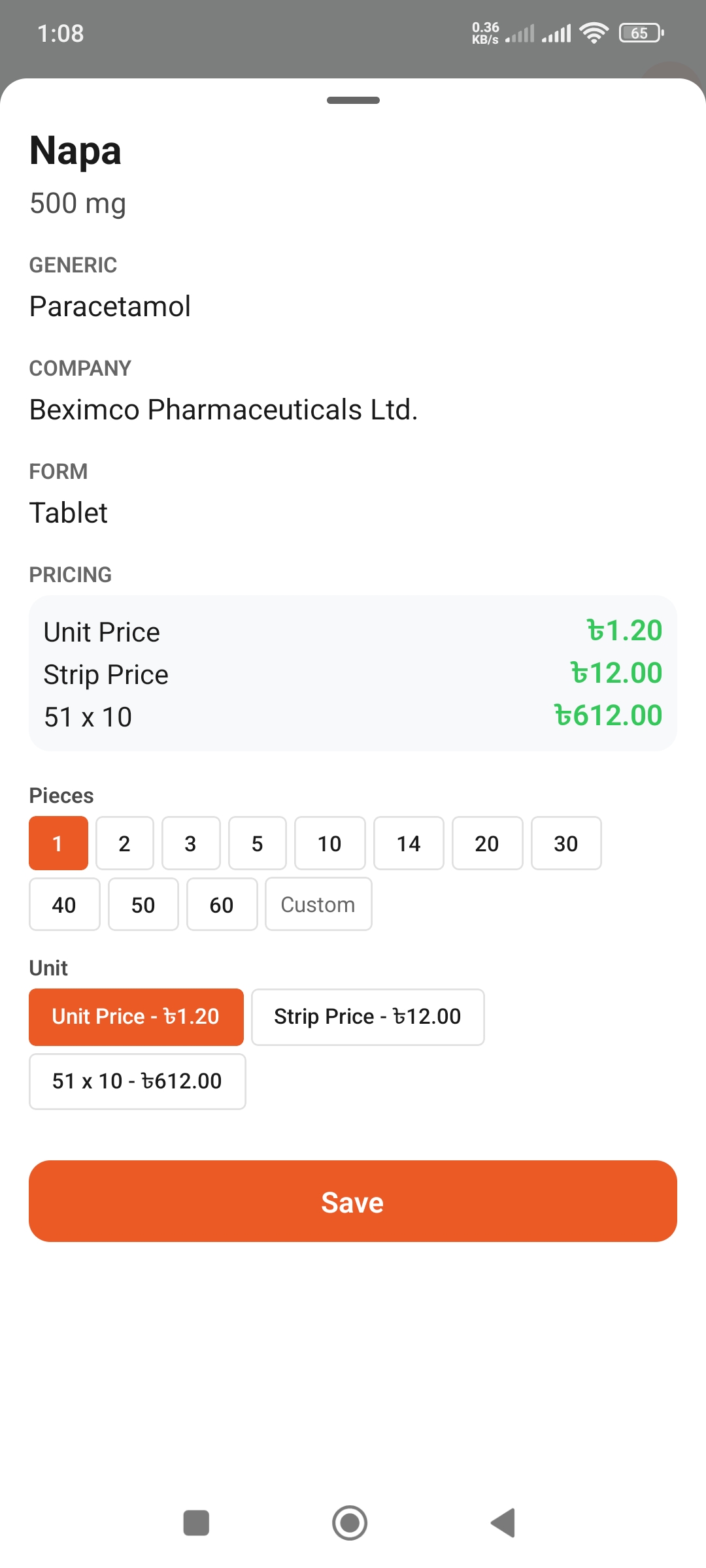
Quantity Input
Step 1: Select Medicine
- Go inside your list
- Tap the + button in top right
- Type medicine name in search bar
- Select the correct medicine from results
Step 2: Set Quantity
- Tap on the quantity input box
- Enter quantity using number keypad
- Confirm the specific amount
Step 3: Add to List
Tap the "Add to List" button. The medicine will be added to your list!
Pricing Options
View Pricing
When adding medicine, you will see the price:
- • Unit Price: Price per unit
- • Total Price: Quantity × Unit Price
- • Strip/Packet: Price by packaging
Pricing Information
- • Prices may vary by pharmacy
- • Shown prices are approximate
- • Check final price at pharmacy
Adding Multiple Medicines
Quick Add Tips
- • Can add another immediately after one
- • Tap the + button again
- • Find previous medicines from search history
- • Add entire prescription at once
Medicine Types
Common Medicine Types
- • Tablet: Solid, swallowable pills
- • Capsule: Gel-coated medicine
- • Syrup: Liquid medicine, for children
- • Drops: Eye drops, nasal drops
- • Injection: Injectable medicine
- • Ointment: Skin cream/ointment
Select Correct Type
Select the exact type written in your doctor's prescription. Do not select the wrong type.